 2020-09-15
 4 min read
I've been running a homelab at home since I started university - soon 10 years
ago - and I've kept expanding and experimenting how I run it. As a student, I
ran everything by hand, because time was cheap and I ran fairly few
applications - GitLab, ownCloud, PiHole, Apache and Roundcube/Postfix, and
nagios for monitoring everything.
When I finished university, we moved to Stockholm and rented a second-hand
apartment. While I set up our own internal network for some security, it was
impossible to set up public access to anything. Instead I set up my machines to
learn Docker and Docker-Swarm, which is what we used at work. When Kubernetes
started coming up as a regular topic, I switched my docker swarm setup for a
Charmed Kubernetes Setup, and used that to learn Kubernetes in my free time, but
didn't have a goal beyond "using Kubernetes".
When we bought our house this summer and got proper internet service again, I
decided I wanted to set up a proper, robust home network with an internal
kubernetes cluster where I could consolidate some off the "externals"1.
The hardware setup #
The hardware I'm using right now is laptops, by choice. It might seem odd, but
at a combination of price/size/noise/power consumption, you can get decent
enterprise-ish laptops a few generations back for pennies. In particular, I'm
really fond of the HP ProBook 64xx series - I had six at one point, but I've
cannabalized two for parts and am looking to replace them.
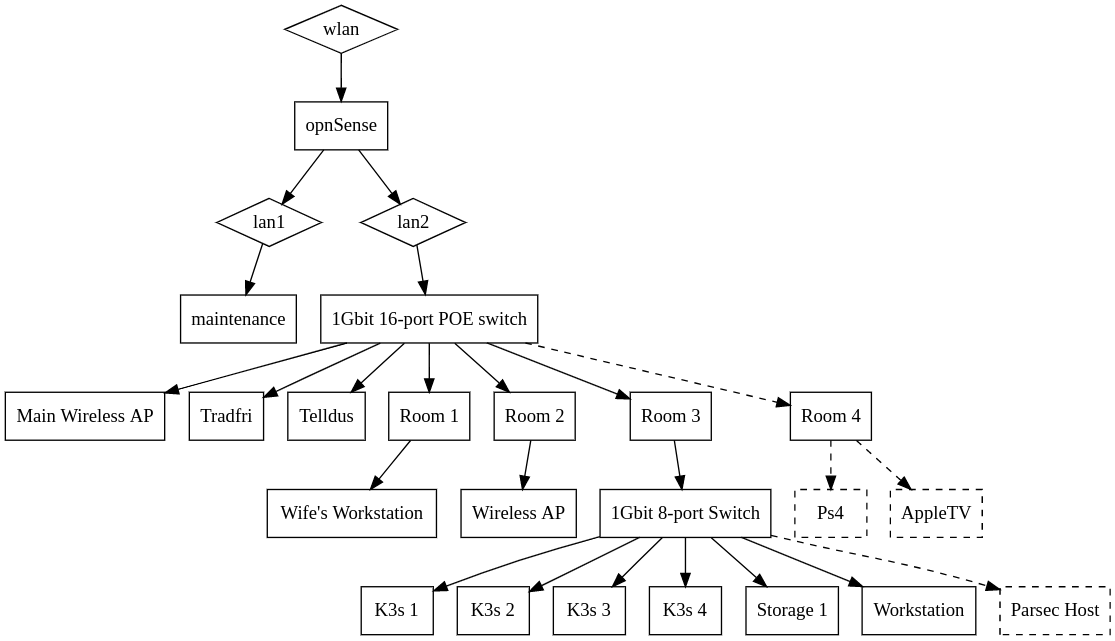
These laptops form my main cluster at this moment, along with a NAS host with
4TB storage. I also run a single Raspberry Pi which will get turned into a
Zigbee proxy at some point in the near point. This is all connected to an 8-port
switch, which leaves 2 open ports. One port is currently hosting my workstation,
and the final port is planned expansion for a Parsec gaming host when I've
decided on hardware.
What I run #
Authentication and Identity #
I'm currently using KeyCloak + Traefik Forward Auth to deal with my
identification needs, but I'm not very happy about this setup and am hoping to
replace it with the full Ory stack when I get the chance.
Cluster management and monitoring #
My primary monitoring tool for my cluster is Prometheus + Grafana, but I also
run KubeView as a high-level view. I also make heavy use of the Traefik
Dashboard, and for special occasions I use the regular Kubernetes dashboard. I
also run an instance of Phatik, as a dogfooding process while I develop it.
Storage #
My primary persistent storage uses Longhorn, which is deployed by default for
K3s. For long-term large storage I use my storage host as a direct IP mount, and
this is also the primary backup location for Longhorn. This whole host is also
backed up offsite. On top of this, my plan is to add Minio as an alternative to
S3 as it's a very common format.
Home automation #
I currently run Home Assistant with HACS as my one-stop-shop. It integrates all
of our home automation tools - robot vacuum, IP cameras2, lights, and smart
plugs. It's very nice to work with and integrates both our Ikea Trådfri and
Telldus, and tracks our home status via the router for extra automations.
Software development #
The two primary services I host are GoHarbor as a semi-public docker registry,
and Concourse which I use for CI and CD, including publishing this blog.
Other tools #
I run Wireguard as kubernetes cluster instead of terminating it on my opnSense
router. This is a bit more to setup but allows me to describe the configuration
directly in code, and takes some pressure of off my router.